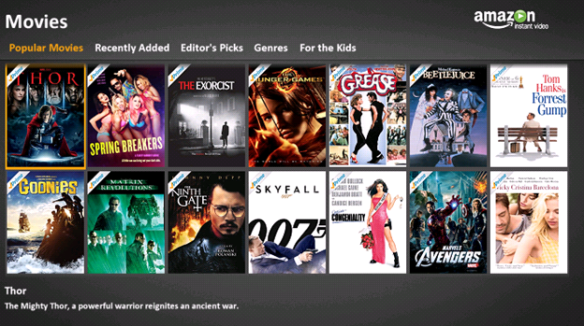
OK, so having been frustrated with Netflix’s increasingly poor range of content, and Amazon’s refusal to acknowledge that anyone might want to use their On-Demand Video streaming service in Windows Media Center, I finally gave in and decided to write my own add-in.
This is my first attempt at a Media Center Add-in, and it has been a steep learning curve, so please bear with me while I continue to enhance this.
My objectives for this stage are simply to provide access to all Amazon content that is free to view by streaming for Amazon Prime customers – I have therefore intentionally excluded content that is not free. I may come back and work on the ability to purchase this later, but it isn’t a high priority for me right now.
Here is what is working so far:
- Amazon Account Login
- Browsing of Movies and TV shows by category
- Search of Movie & TV data (somewhat)
- Viewing of Movie & TV Details
- Movie & TV Playback
Here is what is NOT working:
- Displaying Movie & TV Summaries when searching
- Media Center Extenders (Including XBox 360)
Requirements
- You need to have an Amazon Prime account
(though you can view previews with a normal Amazon account) - The Amazon account needs to be on the US site – I may do other sites later.
- You need an Internet connection (yes, really!)
- You need to have a computer with Windows Media Center – so far, I have only tested this on Windows 7 (32 & 64-bit)
Please note that it can be a little sluggish switching categories at the moment, depending on your internet bandwidth.
If you want to try it out, please download it below, and if you find this useful, please make a small contribution by donating below.
NEW RELEASE 12/9/2012
This includes:
- The ability to browse more than 24 items
- Additional data associated with titles
- Improved video title layout
- A fix to address Amazon’s change of image sizing
- Triple-tap and on-screen keyboard for input boxes
- Stops any playback of existing content when entering the app
- Registry install issues fixed
- Improved stability (though still Alpha release)
![]() |
Installation Instructions
- Download the MSI and install it.
- Once installed, Launch Media Center and go into the Extras Library
- Launch Amazon Video On Demand.
- Enter your Amazon Credentials
- Enjoy your favorite movies from comfort of your chair!
New Issues
If you have any other problems, please use the form below:
Screenshots
|
|
|
|


This could become a much needed addition to media center!
Very exciting… I will be trying it out this weekend. Thanks!
Turned out that adding TV content playback was easier than expected (see screenshot in this article). The current version now supports TV playback as well, but you will need to uninstall the older version and install this newer one.
I kept getting the server error. Installing the registry fix a couple of times fixed that, but I can’t get any movies to play. After choosing a movie the screen turns white. The movie never plays. I can exit back to the menu, but I can’t get any movies to play.
Hi Tim,
Sorry to hear this isn’t working for you. Can you tell me what platform you are running this on, and can you please try to launch Internet Explorer on that machine and try to playback Amazon Video from there to confirm that it works natively from the site? It does need to be Internet Explorer even if you use something like Chrome normally, since this is what my app will be using.
Also, if you have anything in the event logs that might be relevant, please send it through.
I tried to install it on windows 8 and had no luck.
Nvm got it to install. looking forward to updates.
thanks
This is a great start. How remote friendly is it? And how should it be installed so any caching is not done on the OS disk, i.e. I have an SSD for the OS and programs and a second drive for all recordings and libraries.
Thanks for the positive feedback. At the moment, the navigation and play/stop & volume up/down can be controlled by the remote. I haven’t got forward/rewind/skip forward/back working on the remote properly yet, and the search also doesn’t work with the remote as yet.
Currently, there is no caching done at all, but that is a good point. When I get to putting in caching, I will try to keep this a separately selectable option.
I had to share my excitement… http://bigbruin.com/content/primemce_1
Love the addon. I tried it with the xbox slim as media center extender. The adddon ask for credentials but I can’t seem to enter it using the xbox controller or my harmony remote. Bummer. If this works through the extender you have a leg up on netflix that doesn’t require a live account.
Agreed, I need something like this to function on my Xbox 360 extenders…hopefully, this is somewhere on your future to-do list for the plugin…again, keep up the great work!
The media center extender is going to be really tricky, if I can get it working at all. For Windows, I am currently using the flash player to play back content, but the extenders simply don’t support this, so instead, they screen-scrape the pictures at about 5 frames per second. To fix this, I would probably need to transcode the content into something that the extender supports – that is not simple. I definitely would like to get this working, but I wouldn’t hold my breath for it, to be honest!
no worries, I definitely understand how that might be a cumbersome function to work out in the short-term, especially with more pressing needs like the watch list functionality…based on your rapid work so far, however, I wouldn’t put past you to work something out for extenders in the future…keep me updated if you ever decide to work on it…would love to try out the plugin when I have some free time, but since I have a ps3 connected to the same tv as my HTPC, haven’t been pressed to play around with it as of yet…again, thanks for all your hard work on the plugin!
Worked fine with the registry fix on Windows 7 64bit. Make sure you have flash installed in IE even if it’s not your primary browser. And as some one mentioned above try to play the movie from IE. GREAT WORK!!!
This is nice, Netflix, Hulu and Amazon are the three big streams and you have filled a massive hole, thank you.
One thing I would love to see is my watchlist from Amazon so searching isn’t as necessary.
Agreed. This is definitely something I want to have too, so I will work on providing this as soon as I get a few other things working to the level I want.
Hey Gareth, I stop back occasionally to see if you have any new updates but I find it hard to determine if the current is what I am running on my HTPC. Do you think you could add a version number on the file name? I also have a small SSD for my OS and a second drive for all recordings and libraries and I’m also interested in caching to my second drive. Also, when I am viewing TV via the installed tuner card and select Netflix for viewing, I get a pop-up that asks “Stop Playback?” with Yes/No buttons. When I select Yes the tuner feed is killed and it launches into Netflix. This doesn’t happen with your app. I have to work around it by launching into Hulu or Netflix and then back into WMC so the tv tuner signal is killed and then launch into your Amazon Prime app. Does this happen to you or is it just my setup? Thanks for all your hard work!!!
Hi David,
I have put the version number in the setup file name – when I download it from the site, it shows with the correct version number – 1.0.0.27531, but I didn’t have it that way at the start (i.e. it was named without a version), and I have not updated this recently.
Ref caching – this isn’t something I have got to yet – at the moment, images are downloaded on the fly, but when we put in an option to cache, I will make sure that it has a selectable path.
Yes – I see exactly the same problem with it not stopping playback. It is on the list of things to fix, but thanks for raising it.
As I mentioned, I haven’t updated this recently, but I have been very lucky to have Eric Brown (http://www.linkedin.com/in/ericwadebrown) volunteer to help – and he has been doing a great job on a number of bug fixes and improvements, so many thanks to him.
We have made a fair bit of progress on a few things for the next release, but it isn’t quite ready yet – it will still be an alpha (sorry), but we have addressed the original install issue, the showing of more than 24 shows, added more content on the video title pages and are continuing to work on stability etc. However, I would still like to get a few more remote control accessibility and usability issues (like the issue you raised) ironed out before doing the next alpha, so I expect it to be in the next week or so.
Hope that helps,
Gareth
So awesome! Thank you for the great work.
This, sir, is a great piece of work!
Works great with registry update. Hope you can find a way to over come the 24 listing limit.
Thanks so much for building this for us! i’m looking forward to future enhancements, but as is, it rocks!
Hi all,
New version released today with many fixes. Still Alpha, but should address many requests.
Please enjoy, and provide any feedback.
Also, many thanks to Eric Brown for his continued contribution to this project.
Thanks for making this. I installed the newest Alpha on one machine and it works as advertized (prior versions did not) but on my main HTPC I get the menus but when it should be connecting to Amazon I get a white screen. Do I need to install the earlier versions and then run the Dec 9 version?
You shouldn’t need to. That sounds like a problem with your flash player. Do you have flash installed in Internet explorer (it needs to be IE even if you are using chrome, Firefox or other)?
Please try going to amazon and playing a movie in Internet explorer. If it works, but this addin doesn’t, please let me know.
Wow That was FAST!!!. It worked. Flash wasn’t installed on IE. Thanks again for a great plugin. Also if you could tell the guys over on TGB.tv that I don’t get their registration email I’d appreciate it.
I can certainly try, though I am not affiliated with them in any way!
Gareth, you are the man!! Thanks and great work!!!
Thanks for the new version! Works great! I would love to see a Watchlist and an on screen keyboard for loging in, searches, etc…
Everyone else, please donate to help keep this project alive!!! I did.
Thanks for the positive feedback.
For the on-screen keyboard, you should be able to press the OK button on the remote while in the textbox. That should pop up the triple-tap and/or on-screen keyboard view. Let me know if that doesn’t work for you.
The Watchlist is definitely on my radar for things to try to do next.
Worked Great!!!!!!!! Thank you so much!
Can you install it under the Movies session, close to NetFlix? right now it’s buried under the Library items.
Thanks!
I can look at making it more accessible from the main menu, but I am not sure if we can add it to movies – I seem to recall some restrictions in Media Center, but will check and do what I can in the next release.
I would love to see this too, kind of a pain to have steaming services staggered around the menus.
Hi Gareth,
Happy holidays! I’m using an XBox 360 as a media center extender. I know that Amazon has their own app for the Xbox, but I prefer to have it running within MCE. Your app is running on my desktop of course. I’ve initiated the “download” from the Xbox, but I don’t see your app appearing on the Xbox. Am I doing something wrong?
Thanks, and great work on this!
Regards,
- Neil
Hi Neil,
Although this does seem to show up on my extenders, it really doesn’t work at all well on them, including the XBox. Unfortunately, the way Microsoft support extenders for flash content is to screen scrape, which only does about 4 or 5 frames per second, which is unusable.
I can’t see why you can’t see the app in Media Center running on the XBox, but even if you do find it, it really isn’t going to work well for that case.
As I mentioned to Shyam previously in these comments, extenders are going to be challenging, and I am not making promises at the moment, other than to state that this is something that I want too, as I use them extensively in my house.
Sorry I can’t be more help on that one.
Best regards,
Gareth
Two suggestions:
1) Would love to see the icon moved to the Videos strip, since netflix and others are already there.
2) The installer should include a screen that tells the user they need flash installed in IE and perhaps even a button to start ie and go to the flash page to install it. If it is there I did not see it
Big ups for working on this as I have looked at the CLUSTER that is WMC programming and been disappointed a few times by it. Hope it continues to get better.
Cheers mate!
thanks bondoklife -agreed that the icon needs to be more accessible. Will see what I can do on this, as I believe there are some limits on this in WMC. Making the installer show that flash is required, or better yet making it get and install if possible makes a lot of sense. Will try to put this in too.
This is working great, glad someone finally decided to make a plugin! Amazon probably never will.
Do think you will be able to get HD working in the near future or are there significant technical limitations?
Thanks Travis – regarding HD, I am simply pulling the content in the same way as if you browsed the website, and I believe that they limit playback to below HD for this. I will have to look at what it might take to get it working in HD, but from what I can tell so far, it isn’t quick/easy. Sorry
Just downloaded and installed on Win 7 x64 today (1/2/03). So far working great. Great App.. looks and works great.. One feature that Netflix has that is handy.. Que feature.. while browsing through movies, would like to que for later viewing.. thanks for the app.. will keep eye open for Beta and Prod version…
Mark, thanks for the feedback. Amazon has a watchlist facility, and we are trying to get that working for the app too, so that you can add to watchlist, remove, and browse your watchlist. This is something that I really want to have active too.
Gareth, thank you very much! Any plans on making this open source? As a developer, I wouldn’t mind contributing spare time. Thanks again!
Hi James,
I have had this request from a few people, and have now decided to make this open source. You can go to https://bitbucket.org/garethbarr/amazon-media-center-add-in to access the source.
you will need to set powershell (it MUST be 32-bit Powershell) execution policy to unrestricted to allow the build process to run.
I will create a wiki etc on that site later. Please note that the source on there is newer than the current release, but is not fully tested and complete yet. If you want to contribute, please fork the repository and then do a pull request when you have code you want to be merged back in.
Best regards,
Gareth
Thank you for for the great Add-on!! It was exactly what I was looking for. I look forward to any updates you make. Thanks again!
I am using 64 bit Win 7 and the play, pause does not work with a remote using IE9, but if you use IE8 the play, pause on the remote does work. Hope this helps in improving this WMC plug-in.
Thanks for the feedback. Will look into this further.
I wish I could help. I will install this tomorrow. Just what I was looking for.
Gareth great work, does this run on Win8? thanks,
Hi David,
thanks, and yes – this does work on Windows 8
Thank you for putting together this add-on, it has made my wife playing Amazon prime more user friendly for her. I also used Media Center Studio and movie the add-in icon to my movie bar which definitely made it more accessible.
I also realize there has not been any noted success at this point regarding extenders but I thought I’d see what would happen with the Ceton Echo. The icon does show up in my Ceton Echo, I can access the program, I can scroll through to select a show to watch, I can click play to begin playback, and it will show the video of the show but no audio at this point. So I thought I would just add this information for anyone else who may work with this. Thanks again.
Thanks for the feedback. That is the same result I got.
This is an awesome start!!! I am so hopeful that you or the other contributors can made this work on extenders. I didn’t consider the limitations of an extender (vs. an HTPC) when I re-worked my system and I’ve been disappointed that I can’t watch the Prime videos on my TV.
This is awesome news! After letting the HTPC back up to our WHS tonight I will be installing the plugin this weekend to see what happens. I have Netflix and Hulu added to the Pictures/Videos strip (customized) and I envision putting this over there as well. Would make this the super-duper ultimate media center of awesomeness! (You have no idea how much I have wanted to have this integrated within MC!)
This addin is so fantastic, it deserves its own icon on the main start menu within MCE. Great work, and can’t wait for updates.
Can’t imagine the amount of effort that went into creating what you have done to date. It is such a huge leap forward, it pains me to request the below nice to haves. If they are possible, fantastic. If not, no worries, as what you have developed so far is a billon times better than what was there before. Here would be my suggestions in priority order.
1) watch list functionality
2) resume movie button from within movie detail screen
3) progress meter when viewing a season list of a tv show
3) remote commands for skip forward and better handling of stop
4) numbered episodes for tv
5) tile on main start menu or within the movies strip
6) mini video player when you navigate away from full screen movie
7) home button within app to get back to main screen
Like I said, these would be nice to haves, but what you have done to date is incredible. Thanks again.
Great stuff… will be testing this out this week, just what I was looking for!
Gareth,
Love your product. Windows Media Center isn’t going to be around forever you know. Any interest into building this for something like Media Browser?
http://www.mediabrowser.tv/
Hi Luke,
Thanks for your feedback. I haven’t really looked at Media Browser, but may consider it – however, I do have very limited spare time at the moment.
If anyone that is using and developing for that application wants to use the source to create something similar, hopefully that would jumpstart their development.
Best regards,
Gareth
Gareth,
I installed your amazon wmc plugin over the weekend. I can log in to amazon and browse through the menus fine however when i select a program and press play I just get a black white screen. Any idea on what may be causing the issue?
Hi there Ed,
This is a problem with the installer at the moment – simply put, we are not yet checking if you have Flash installed in Internet Explorer on your machine. If you don’t have Flash, it doesn’t work. NOTE: It is important that you do this in Internet Explorer, even if you use Chrome/Firefox etc, since Media Center uses Internet Explorer for this purpose.
You should be able to remedy this easily by launching Internet Explorer and going and installing Flash into it, then relaunching Media Center.
Let me know if you have any issues with this.
Best regards,
Gareth
Gareth,
Simple fix! I like that. Thanks you very much for the quick response and for the time you put into the plugin!
-Ed
Thank you for this. I, like many, have been waiting for Amazon to release a Media Center extension. I really appreciate you taking the time to do this. It works great for me.
Awesome add-on Gareth! Works flawlessly running W7 64bit on my htpc. Also extremely interested in extender play(am not paying for gold to watch something I am already paying for!!). Just for kicks tried it on my xbox 360 extender & got it to play but with no sound and playback very jerky. Folks who are interested in this, donate for his hard work, I did!
Are you making the source available? I am really trying to learn how to make plugins for MC, but the SDK tutorials are awful, and I’d like to look at this one. It seems like a good start. Also, I’d like to try my hand at adding a hook to the WatchList on an amazon account. Seems like a good way to display purchased items for playing…
Source is available at https://bitbucket.org/garethbarr/amazon-media-center-add-in. Am very happy to accept any help in improving this.
Just wanted to say thank you for this! I have searched for a while for an add on like this and am now streaming movies on my windows 8 media center. Can’t wait to see further updates and thank you for developing this!
Did the TV section just recently break? The only section in TV that has any content is Popular TV Shows and it only has Doctor Who.Every other TV section is empty. The Movies sections are working fine.
Thank you very much!
Thank you for making this. I use it to watch Fringe on my MCE.
One thing I notice is that if you pause a show that is playing and leave it paused for a bit of time (5 or 10 minutes) it will start playing the show/movie from the beginning.
Thanks again, it is much appreciated!
Installed and it worked perfectly! Thank you so much for your hard work!
Works like a champ! My somewhat impatient 3 year old likes to navigate through MCE and click on your Amazon icon to load all his favorite Kids shows. We both will be over the moon if you can include the Watchlist feature. Great work so far Gareth!
Gareth,
I’m the developer for My Memories for Windows Media Center and have a quick question for you. I can’t seem to find any way to check to see if your addin is playing media and thus, my screen saver addin will launch even though a user is watching something. Do you do anything or can you do something while media is playing so that I (and possibly others) could tell if media is playing in your addin?
Thanks!
Mark Terborg
MJT Software & Services Inc.
I would love to be able to play the movies i have purchased with your plugin. otherwise this is great. thanks for your hard work!
So far, so good. Thanks so much for making this!
For some reason, search does not work properly. Searching on Mythbusters, for example, pulls a random set of seasons that seems to change from day to day – the first day Season 3 was one of the options, the next day it wouldn’t come up either browsing or searching. But it’s still available from the browser…
Love this addon! Is it still being developed?
Hi George,
I have been tied up on another project for quite a while now, but am expecting to start developing this further again in the next few weeks.
Best regards,
Gareth
Excellent Job!
Hi Gareth,
Thanks you VERY much for what you’ve done. The only major feature I feel this is missing is the ability to play Amazon Prime videos and videos that have been paid for. Thanks for all your hard work!
Awsome man, especially now with Amazon forcing DRM, XBMC doesn’t work but this does, thanks!